
What Is Cloudflare? (Simple Explanation)
Cloudflare is a free service that sits between your visitors and your website.
Think of it as a security guard and a fast delivery boy in one.
It gives you a CDN. A CDN keeps copies of your site on servers around the world.
A visitor in Karachi gets your page from the nearest server. Not from a far server.
Closer server means a faster page load. That is the whole idea.
Why Your Pakistani Site Needs Cloudflare WordPress Pakistan
Many Pakistani businesses host on cheap shared servers. Some host abroad, far from visitors.
Your pages load slowly. Visitors leave before they read anything.
Google ranks slow sites lower. Speed is now a ranking factor.
International customers face even slower loads. A visitor in Dubai waits longer than one in Lahore.
Attacks are common too. Bots hammer WordPress login pages every day.
This is where Cloudflare WordPress Pakistan shines. One free setup fixes speed and security together.
Is your site slow right now? Read our WordPress speed guide to find what is dragging it down.
What Cloudflare Gives You for Free
The free plan is generous. Most small sites never need more.
Free CDN
Copies of your site on servers worldwide. Visitors load the nearest copy.
DDoS Protection
DDoS means a flood of fake traffic meant to crash your site. Cloudflare blocks it.
Free SSL
SSL is the padlock that keeps visitor data safe. Cloudflare gives it free.
Fast DNS
DNS is the system that turns your domain into an address. Cloudflare DNS is very fast.
Firewall Rules
Block bad countries, bad bots, and spam. Set simple rules with clicks.
Smart Caching
Cloudflare stores your pages. Repeat visitors get them instantly.
Cloudflare WordPress Pakistan: Setup Step by Step
This Cloudflare WordPress Pakistan setup takes about 30 minutes. Follow each step.
Go to cloudflare.com and create a free account. Pick the free plan.
Type your domain name. Cloudflare scans your current DNS records.
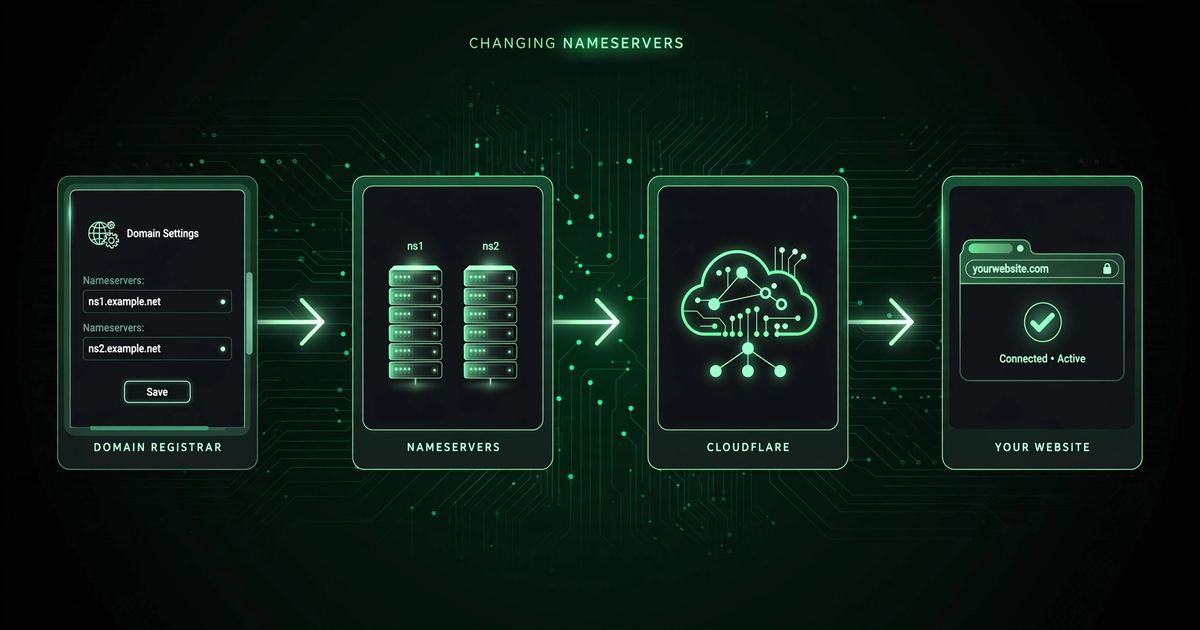
Nameservers are the address book that tells the internet where your domain lives.
Copy the two nameservers Cloudflare gives you. Paste them at your domain registrar.
Your registrar is the company where you bought your domain name.
It can take a few minutes. Sometimes it takes up to 24 hours.
Cloudflare emails you when your site is active.
In WordPress, install the official "Cloudflare" plugin. Connect your account.
The plugin purges old cached copies when you update a post.
Auto Minify removes extra spaces from your code. Smaller files load faster.
Turn it on for JavaScript and CSS. Test your site after.
In Cloudflare, go to SSL settings. Choose "Full". See the next section for why.
Choosing the Right SSL Mode
SSL keeps the connection between your visitor and your site safe. Cloudflare offers three modes. See the official Cloudflare SSL docs for the full details.
| Mode | What It Does | Best For |
|---|---|---|
| Flexible | Secure from visitor to Cloudflare only. Not secure to your server. | Only if your host has no SSL at all. |
| Full | Secure on both sides. Your server needs any SSL certificate. | Most WordPress sites. The best default. |
| Full (Strict) | Secure on both sides with a verified certificate. | Shops and sites handling payments. |
Pick Full for most sites. It is secure and simple.
The Cloudflare WordPress Plugin: Settings That Matter
The official plugin connects WordPress to Cloudflare. Install it from the plugin directory.
Connect it with one click. No API keys needed anymore.
Page Rules vs Cache Rules: 3 Useful Rules
Rules tell Cloudflare how to treat certain pages. The free plan gives you 3 page rules.
Use them wisely. These three cover most WordPress sites.
Target yourdomain.com/wp-admin*. Set cache level to "Bypass". Your dashboard must always be fresh.
Target yourdomain.com/*. Turn on "Always Use HTTPS". Every visitor gets the secure version.
Target yourdomain.com/*. Set "Edge Cache TTL" to one month. Blog posts rarely change.
Cloudflare + Your Caching Plugin: Don't Double-Cache
Many WordPress sites already use a caching plugin like WP Rocket or LiteSpeed Cache.
Keep both, but split the jobs. Let each tool do what it does best.
Your caching plugin handles page caching on your server. Cloudflare handles the CDN and security.
Do not minify in two places. Turn on minify in ONE place only.
If your layout breaks, turn off Auto Minify in Cloudflare first. Your plugin can handle it.
How to Test Your Cloudflare WordPress Pakistan Setup
Your Cloudflare WordPress Pakistan setup is live. Now verify everything works.
Common Problems and Simple Fixes
Most issues have simple fixes. Start with these.
Mistakes to Avoid
These mistakes break sites. Avoid all six.
How to Measure Your Results
Track these numbers after your Cloudflare WordPress Pakistan setup.
| Number | What It Means | What You Want |
|---|---|---|
| Load time | Seconds until your page is fully loaded | Lower than before |
| TTFB | Time to first byte — how fast the server first responds | Under 600ms |
| Blocked threats | Attacks Cloudflare stopped in the dashboard | Rising count is good |
| Bandwidth saved | Traffic served from cache instead of your server | Higher is better |
Test on mobile too. Most Pakistani visitors use phones.
Want a faster site overall? Our WordPress development in Karachi team builds speed into every site.
Myths vs Reality
People believe wrong things about Cloudflare.
Cloudflare WordPress Pakistan Setup Checklist
Run this Cloudflare WordPress Pakistan checklist before you call it done.
Your 4-Step Action Plan
Start your Cloudflare WordPress Pakistan setup today. Four steps.
Create your free Cloudflare account and add your domain.
Update them at your registrar. Wait for the activation email.
Connect the official plugin. Set SSL to Full. Turn on caching.
Check speed, forms, and admin. Record your before and after numbers.
Cloudflare WordPress Pakistan — FAQs
Top questions about Cloudflare WordPress Pakistan.
Is Cloudflare really free?
Yes. The free plan covers CDN, SSL, and DDoS protection.
Most small Pakistani business sites never need more.
Will Cloudflare slow down my WordPress admin?
No. Add the wp-admin bypass rule. Your dashboard stays fresh.
How long does the nameserver change take?
A few minutes to 24 hours. Cloudflare emails you when it is done.
Do I still need a caching plugin?
Yes. They do different jobs. Your plugin caches on the server. Cloudflare caches worldwide.
What if something breaks during setup?
Change your nameservers back to your old host. Your site returns to normal.
Want Cloudflare Set Up Without the Headache?
This guide gave you the playbook. Now let experts run it.
We set up Cloudflare on WordPress for Pakistani businesses — DNS, SSL, caching, all tested.
Get a Free Speed Audit